![logo--white-s-2.svg]](https://help.streamwork.com/hubfs/logo--white-s-2.svg)
How you access integrations depends on your role in StreamWork.
Organization admin integrations
Some integrations—like Asana, monday.com, and LTI (for universities)—can only be set up by an Organization Admin. If you're not an Organization Admin and need access to a specific integration, please reach out to your Admin directly to request approval to access.
How to Access Admin Integrations
If you’re an Organization Admin:
- Click your avatar and name in the top-right corner of your StreamWork account.
- Select Admin Settings.
- Navigate to the Integrations tab.
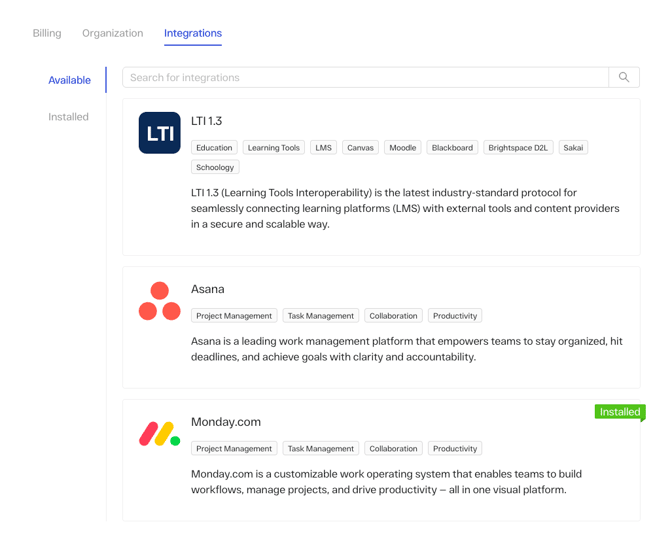
From the integrations tab, you can:
- View all available integrations in your account
- Search for a specific integration
- Filter by Available or Installed integrations
How to connect an admin integration
- Click the integration you’d like to connect (e.g., Asana or monday.com).
- Follow the setup prompts.
- Sign in to your existing account for that platform when prompted.
- Complete the authorization steps to finish setup.
For step-by-step instructions, check out these Help Center articles:
- How to connect Asana
- How to connect monday.com
- How to connect Slack
Note: The LTI integration is available for universities and education partners only and must be configured by an Organization Admin. If you'd like discuss the LTI integration or need help with set-up, reach out to support@streamwork.com.
Integrations available to all StreamWork users
StreamWork also offers several out-of-the-box integrations that are available to all roles, without admin access.
Slack Integration
To connect Slack, follow the step-by-step instructions in this Help Article: How to Integrate Slack with StreamWork
Cloud Storage Integrations (Google Drive, Dropbox, Box)
You can upload files directly from your existing storage tools—no setup required.
How to Upload from a Storage Provider:
1. Click the Upload button anywhere in StreamWork.

2. Choose Google Drive, Dropbox, or Box.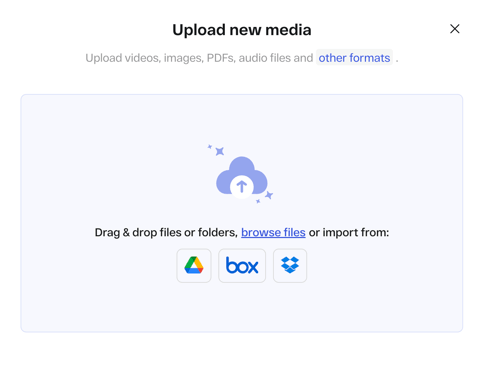
3. Sign in to the selected platform.
4. Select the files you want to upload.
5. Your files will upload directly into StreamWork and be ready for review.
Custom integrations & API access
For enterprise organizations with more complex workflows, StreamWork offers custom integrations via our API, including:
- Microsoft services (including SharePoint)
- Digital Asset Management (DAM) systems
- Single Sign-On (SSO)
- Additional project management or enterprise tools
If you’re using a custom creative stack or need a specific integration, reach out to our team at support@streamwork.com to discuss your setup.