---
title: How do I change my account password?
description: StreamWork makes it easy to reset your password if you’ve forgotten it, or you can update it anytime from within your account.
---
[Skip to content](https://help.streamwork.com/knowledge/how-do-i-change-my-account-password#main-content)
English
Show submenu for translations
![logo--white-s-2.svg\]](https://help.streamwork.com/hubfs/logo--white-s-2.svg)
Open main navigation
Close main navigation
- English
Show submenu for translations
- Product
Product
Hello. How can we help you?
- There are no suggestions because the search field is empty.
1. [Help Center](https://help.streamwork.com/knowledge?hsLang=en)
2. [Account settings and notifications](https://help.streamwork.com/knowledge/account-settings-and-notifications?hsLang=en)
# How do I change my account password?
## StreamWork makes it easy to reset your password if you’ve forgotten it—or update it anytime from within your account.
### If you forgot your password:
If you’re unable to sign in because you forgot your password, you can reset it directly from the sign-in page.
#### Steps to reset your password:
1\. Go to the **StreamWork sign-in page** ([www.app.streamwork.com](http://www.app.streamwork.com))
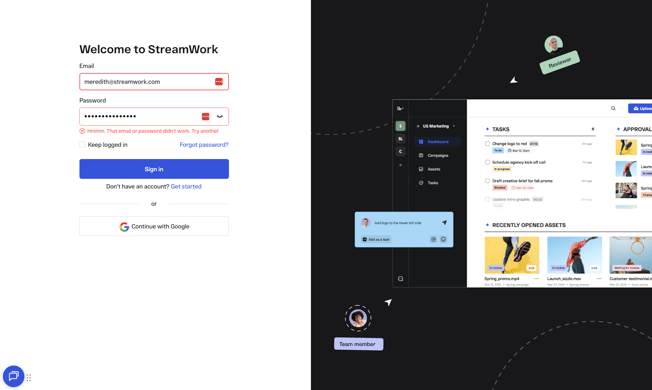
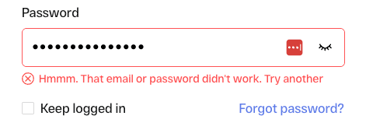
2\. Click **“Forgot password?”**
3\. Enter the email address associated with your StreamWork account.
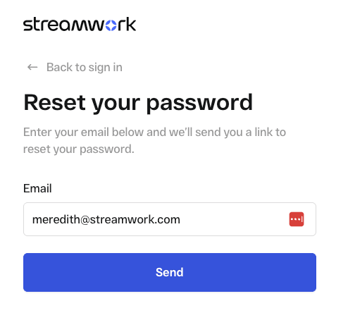
4\. If an account exists for that email, a password reset email will be sent automatically.
5\. Open the email and follow the instructions to create a new password.
**Note:** The reset email will only be sent if the email address is associated with an existing StreamWork account.
### If you’re logged in and want to change your password:
If you’re already signed in and would like to update your password, you can do so from your account settings.
#### Steps to change your password:
1\. Click your avatar and name in the top-right corner of your StreamWork account.
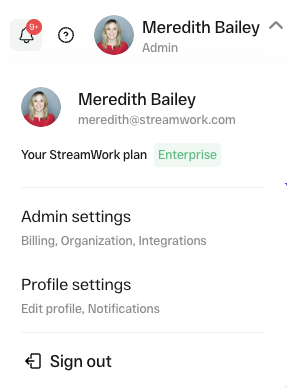
2\. Select **Profile Settings** from the dropdown menu.
3\. Navigate to the **Account Settings** tab.
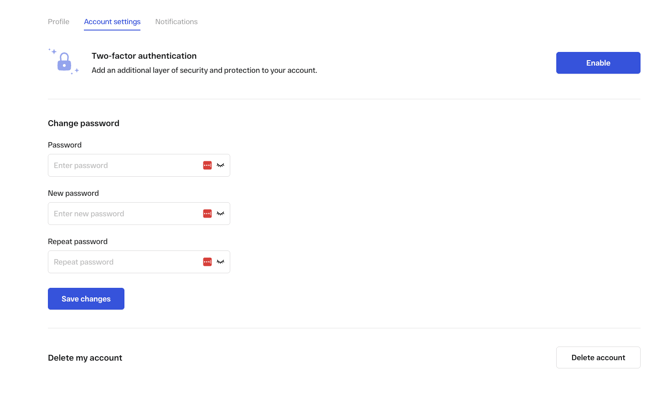
3\. Enter your **current password**.
4\. Enter your **new password**.
5\. Re-enter the new password to confirm it.
6\. Click "Save changes." Once saved, your password will be updated immediately.
### Tips & Troubleshooting
- Make sure your new password meets the minimum security criteria (one uppercase letter, one lowercase letter, one number, one special character, 12+ characters).
- If you don’t receive a password reset email, check your spam or junk folder.
- If you continue to have trouble resetting or changing your password, contact our support team for help.
### Need Help?
If you have questions or run into any issues, reach out to us at **support@streamwork.com** and we’ll be happy to assist.
- [About StreamWork](https://help.streamwork.com/knowledge/about-streamwork?hsLang=en)
- [Get started](https://help.streamwork.com/knowledge/get-started?hsLang=en)
- [Roles](https://help.streamwork.com/knowledge/roles?hsLang=en)
- [Workspaces](https://help.streamwork.com/knowledge/workspaces?hsLang=en)
- [Projects](https://help.streamwork.com/knowledge/projects?hsLang=en#main-content)
- [Projects - Project Permissions](https://help.streamwork.com/knowledge/projects?hsLang=en#projects-project-permissions)
- [Folders](https://help.streamwork.com/knowledge/folders?hsLang=en)
- [Media](https://help.streamwork.com/knowledge/media?hsLang=en#main-content)
- [Media - Media Management](https://help.streamwork.com/knowledge/media?hsLang=en#media-media-management)
- [Comments and Annotations](https://help.streamwork.com/knowledge/comments-and-annotations?hsLang=en#main-content)
- [Comments and Annotations - Management](https://help.streamwork.com/knowledge/comments-and-annotations?hsLang=en#comments-and-annotations-management)
- [Tasks](https://help.streamwork.com/knowledge/tasks?hsLang=en#main-content)
- [Tasks - Task Management](https://help.streamwork.com/knowledge/tasks?hsLang=en#tasks-task-management)
- [Approval routing](https://help.streamwork.com/knowledge/approval-routing?hsLang=en)
- [Share links](https://help.streamwork.com/knowledge/share-links?hsLang=en)
- [Integrations](https://help.streamwork.com/knowledge/integrations?hsLang=en)
- [Account settings and notifications](https://help.streamwork.com/knowledge/account-settings-and-notifications?hsLang=en)
[](https://www.streamwork.com/)
Copyright © 2026, StreamWork