---
title: How do I copy comments across assets?
description: Learn how to copy comments from one asset and paste them onto another version or related file in StreamWork, so you can reuse feedback without retyping it.
---
[Skip to content](https://help.streamwork.com/knowledge/how-do-i-copy-comments-across-assets#main-content)
English
Show submenu for translations
![logo--white-s-2.svg\]](https://help.streamwork.com/hubfs/logo--white-s-2.svg)
Open main navigation
Close main navigation
- English
Show submenu for translations
- Product
Product
Hello. How can we help you?
- There are no suggestions because the search field is empty.
1. [Help Center](https://help.streamwork.com/knowledge?hsLang=en)
2. [Comments and Annotations](https://help.streamwork.com/knowledge/comments-and-annotations?hsLang=en)
# How do I copy comments across assets?
## The copy comments feature lets you reuse feedback from one asset on another version or related file, so you don't have to retype the same note more than once.
**How to copy comments?**
1. Open a file in the Media Viewer and go to the comment panel on the right side
2. Click the More options menu (three dots) in the top of the comment panel
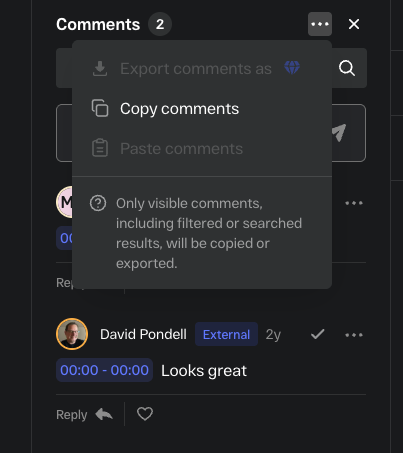
1. Select "Copy comments"
2. Navigate to the asset you want to paste it onto
3. Open that file in the Media Viewer
4. Go to the More options menu (three dots) in the comment panel and click "Paste comments." All comments will paste onto the new asset.
**Things to know**
- Copied comments retain their original text. Any annotation markups will not appear on the new asset or version where the comment text was pasted.
- You can copy comments across different files within the same project
- Copying a comment does not remove it from the original asset
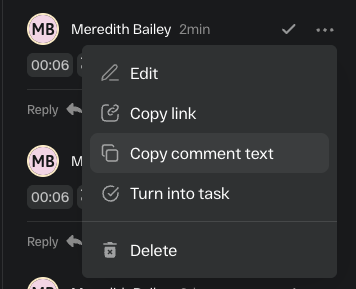
- If you'd like to copy individual comment text, go to the 3 dot menu in the top right of the individual comment and click "Copy comment text"
- [About StreamWork](https://help.streamwork.com/knowledge/about-streamwork?hsLang=en)
- [Get started](https://help.streamwork.com/knowledge/get-started?hsLang=en)
- [Roles](https://help.streamwork.com/knowledge/roles?hsLang=en)
- [Workspaces](https://help.streamwork.com/knowledge/workspaces?hsLang=en)
- [Projects](https://help.streamwork.com/knowledge/projects?hsLang=en#main-content)
- [Projects - Project Permissions](https://help.streamwork.com/knowledge/projects?hsLang=en#projects-project-permissions)
- [Folders](https://help.streamwork.com/knowledge/folders?hsLang=en)
- [Media](https://help.streamwork.com/knowledge/media?hsLang=en#main-content)
- [Media - Media Management](https://help.streamwork.com/knowledge/media?hsLang=en#media-media-management)
- [Comments and Annotations](https://help.streamwork.com/knowledge/comments-and-annotations?hsLang=en#main-content)
- [Comments and Annotations - Management](https://help.streamwork.com/knowledge/comments-and-annotations?hsLang=en#comments-and-annotations-management)
- [Tasks](https://help.streamwork.com/knowledge/tasks?hsLang=en#main-content)
- [Tasks - Task Management](https://help.streamwork.com/knowledge/tasks?hsLang=en#tasks-task-management)
- [Approval routing](https://help.streamwork.com/knowledge/approval-routing?hsLang=en)
- [Share links](https://help.streamwork.com/knowledge/share-links?hsLang=en)
- [Integrations](https://help.streamwork.com/knowledge/integrations?hsLang=en)
- [Account settings and notifications](https://help.streamwork.com/knowledge/account-settings-and-notifications?hsLang=en)
[](https://www.streamwork.com/)
Copyright © 2026, StreamWork