---
title: How do I create a project?
description: Projects are how media and folders are organized in StreamWork. Creating a new project is straightforward.
---
[Skip to content](https://help.streamwork.com/knowledge/how-do-i-create-a-project#main-content)
English
Show submenu for translations
![logo--white-s-2.svg\]](https://help.streamwork.com/hubfs/logo--white-s-2.svg)
Open main navigation
Close main navigation
- English
Show submenu for translations
- Product
Product
Hello. How can we help you?
- There are no suggestions because the search field is empty.
1. [Help Center](https://help.streamwork.com/knowledge?hsLang=en)
2. [Projects](https://help.streamwork.com/knowledge/projects?hsLang=en)
# How do I create a project?
## Projects are how media and folders are organized in StreamWork. Creating a new project is straightforward.
To create a project:
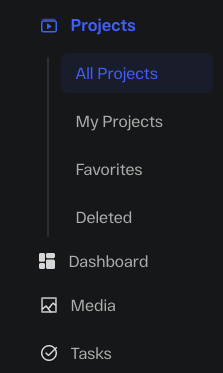
1\. Click on “Project” in the main navigation, and then select “All Projects.”
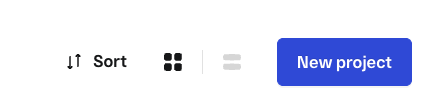
2\. Click on the blue button in the top right of the screen called “New project”
3\. Next, the project set-up window will open. To create a project, first name the project and then choose whether the project is shared with all users in the workspace or private to only yourself or a few users you select.
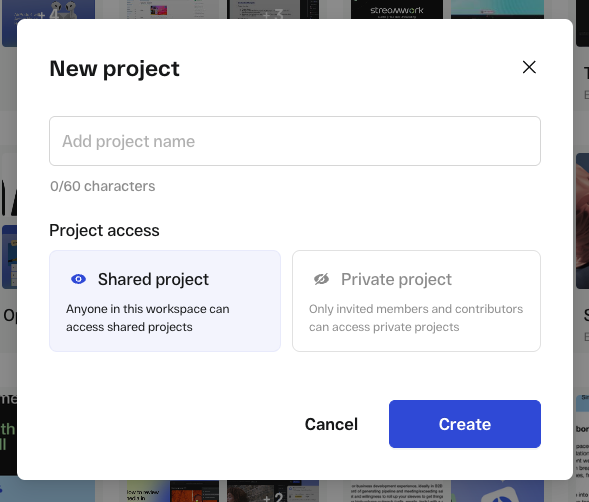
**Tip:** If you select shared, the project will be shared with everyone invited to the workspace. If you select private, the project will only be accessible to people you invite to the project. You can manage who is invited to the project at any time in “Project info.”
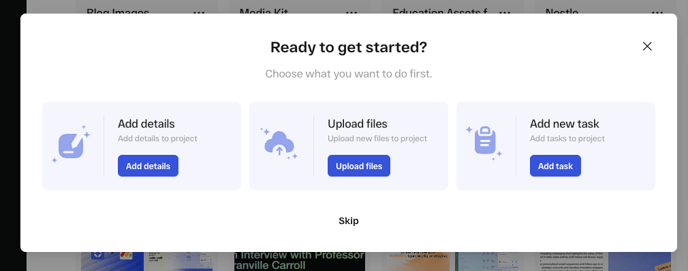
4\. After you’ve selected whether the project is shared or private, click “Create.” You’ll next see a window to guide you through project creation. You have 3 options to get started:
- Fill in project information (i.e. draft or upload your creative brief)
- Upload a media file
- Create your first task
**Tip:** If this is your first project, we recommend that you start by uploading a media file.
Note: You can also create a project as part of an upload media flow.
Watch the following video to learn how to create a new project after uploading a media file to StreamWork:
- [About StreamWork](https://help.streamwork.com/knowledge/about-streamwork?hsLang=en)
- [Get started](https://help.streamwork.com/knowledge/get-started?hsLang=en)
- [Roles](https://help.streamwork.com/knowledge/roles?hsLang=en)
- [Workspaces](https://help.streamwork.com/knowledge/workspaces?hsLang=en)
- [Projects](https://help.streamwork.com/knowledge/projects?hsLang=en#main-content)
- [Projects - Project Permissions](https://help.streamwork.com/knowledge/projects?hsLang=en#projects-project-permissions)
- [Folders](https://help.streamwork.com/knowledge/folders?hsLang=en)
- [Media](https://help.streamwork.com/knowledge/media?hsLang=en#main-content)
- [Media - Media Management](https://help.streamwork.com/knowledge/media?hsLang=en#media-media-management)
- [Comments and Annotations](https://help.streamwork.com/knowledge/comments-and-annotations?hsLang=en#main-content)
- [Comments and Annotations - Management](https://help.streamwork.com/knowledge/comments-and-annotations?hsLang=en#comments-and-annotations-management)
- [Tasks](https://help.streamwork.com/knowledge/tasks?hsLang=en#main-content)
- [Tasks - Task Management](https://help.streamwork.com/knowledge/tasks?hsLang=en#tasks-task-management)
- [Approval routing](https://help.streamwork.com/knowledge/approval-routing?hsLang=en)
- [Share links](https://help.streamwork.com/knowledge/share-links?hsLang=en)
- [Integrations](https://help.streamwork.com/knowledge/integrations?hsLang=en)
- [Account settings and notifications](https://help.streamwork.com/knowledge/account-settings-and-notifications?hsLang=en)
[](https://www.streamwork.com/)
Copyright © 2026, StreamWork