---
title: How do I create subfolders?
description: Learn how to create nested subfolders inside your StreamWork projects to keep files organized across campaigns, deliverables, and asset types.
---
[Skip to content](https://help.streamwork.com/knowledge/how-do-i-create-subfolders#main-content)
English
Show submenu for translations
![logo--white-s-2.svg\]](https://help.streamwork.com/hubfs/logo--white-s-2.svg)
Open main navigation
Close main navigation
- English
Show submenu for translations
- Product
Product
Hello. How can we help you?
- There are no suggestions because the search field is empty.
1. [Help Center](https://help.streamwork.com/knowledge?hsLang=en)
2. [Folders](https://help.streamwork.com/knowledge/folders?hsLang=en)
# How do I create subfolders?
## Subfolders let you create a nested folder structure inside your projects, so you can organize files across campaigns, deliverable types, or however your team works best.
****
**How to create a subfolder**
1\. Open a project in StreamWork
2\. Navigate to the folder where you want to create a subfolder
3\. Click the New folder button or right-click inside the folder
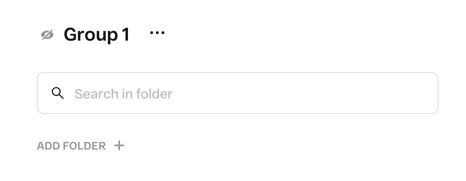
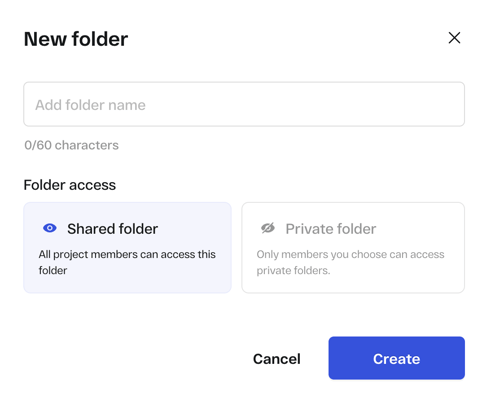
4\. Select Create subfolder
5\. Name the subfolder and press Enter or click Save
**Moving files into a subfolder**
1. Select the file or files you want to move
2. Right-click and select Move to
3. Choose the destination subfolder and click Move. Note: StreamWork also supports drag & drop of files too.
**Renaming a subfolder**
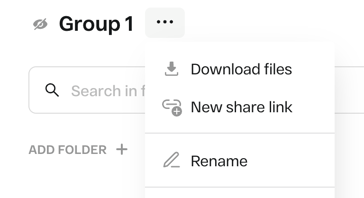
1. Inside of the Subfolder, click on the 3-dot menu to the right of the name
2. Select Rename
3. Type the new name and press Enter
**Deleting a subfolder**
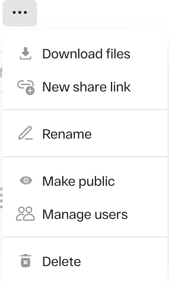
1. Right-click the 3-dot menu on the subfolder
2. Select Delete
3. Confirm deletion. Note: deleting a subfolder will also delete all files inside it.
**Things to know**
- Subfolders can be nested inside other folders and subfolders
- Subfolders can be shared or private. If private, you can manage who within the workspace has access to the subfolder.
- There is no limit to the number of subfolders you can create
- [About StreamWork](https://help.streamwork.com/knowledge/about-streamwork?hsLang=en)
- [Get started](https://help.streamwork.com/knowledge/get-started?hsLang=en)
- [Roles](https://help.streamwork.com/knowledge/roles?hsLang=en)
- [Workspaces](https://help.streamwork.com/knowledge/workspaces?hsLang=en)
- [Projects](https://help.streamwork.com/knowledge/projects?hsLang=en#main-content)
- [Projects - Project Permissions](https://help.streamwork.com/knowledge/projects?hsLang=en#projects-project-permissions)
- [Folders](https://help.streamwork.com/knowledge/folders?hsLang=en)
- [Media](https://help.streamwork.com/knowledge/media?hsLang=en#main-content)
- [Media - Media Management](https://help.streamwork.com/knowledge/media?hsLang=en#media-media-management)
- [Comments and Annotations](https://help.streamwork.com/knowledge/comments-and-annotations?hsLang=en#main-content)
- [Comments and Annotations - Management](https://help.streamwork.com/knowledge/comments-and-annotations?hsLang=en#comments-and-annotations-management)
- [Tasks](https://help.streamwork.com/knowledge/tasks?hsLang=en#main-content)
- [Tasks - Task Management](https://help.streamwork.com/knowledge/tasks?hsLang=en#tasks-task-management)
- [Approval routing](https://help.streamwork.com/knowledge/approval-routing?hsLang=en)
- [Share links](https://help.streamwork.com/knowledge/share-links?hsLang=en)
- [Integrations](https://help.streamwork.com/knowledge/integrations?hsLang=en)
- [Account settings and notifications](https://help.streamwork.com/knowledge/account-settings-and-notifications?hsLang=en)
[](https://www.streamwork.com/)
Copyright © 2026, StreamWork