---
title: How do I manage who has access to a project?
description: You can view and manage project access anytime through the Project Info panel
---
[Skip to content](https://help.streamwork.com/knowledge/how-do-i-manage-who-has-access-to-a-project#main-content)
English
Show submenu for translations
![logo--white-s-2.svg\]](https://help.streamwork.com/hubfs/logo--white-s-2.svg)
Open main navigation
Close main navigation
- English
Show submenu for translations
- Product
Product
Hello. How can we help you?
- There are no suggestions because the search field is empty.
1. [Help Center](https://help.streamwork.com/knowledge?hsLang=en)
2. [Projects](https://help.streamwork.com/knowledge/projects?hsLang=en)
3. [Projects - Project Permissions](https://help.streamwork.com/knowledge/projects?hsLang=en#projects-project-permissions)
# How do I manage who has access to a project?
## You can view and manage project access anytime through the Project Info panel
**To see or manage who has access to a project:**
1\. From inside of a project, click on the “Project info” button in the upper right hand corner of the main project page.

2\. Select the “Members” tab
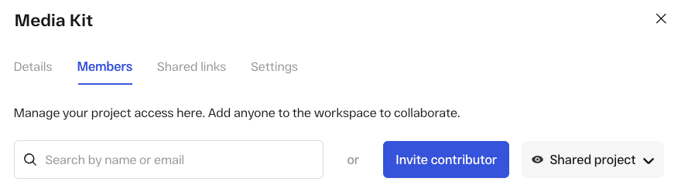
3\. You will see a list of project members who have access to the project and their assigned role in StreamWork. If you've created Groups in StreamWork, those Groups will also appear in the list and you can choose to enable access to the entire Group.
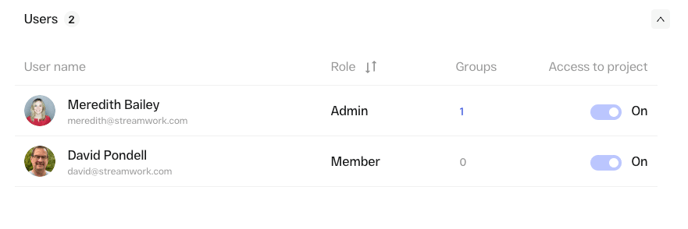
**Note:** You can not change an individual’s role from within a project. To change an individual’s role, head to workspace member management and change their role there. Their updated role will be reflected in all projects they are invited to in StreamWork. Learn how to manage workspace members and roles in this [Help Center article](https://help.streamwork.com/knowledge/how-do-i-manage-members-in-a-workspace?hsLang=en).
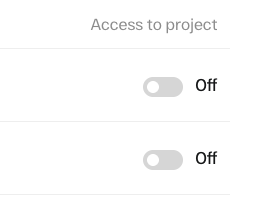
4\. If you would like to remove a member or contributor who currently has access to a project, you can toggle their project access to "off"
5\. If you would like to invite additional contributors to a project, click “Invite contributor” in the top right corner. Contributors are invited to specific campaigns or folders by other users and can only access the media within those areas. They’re typically external collaborators, such as vendors or contractors, who need limited access to support a project.
**Tip:** Learn how to invite a contributor to a project in this [Help Center article](https://help.streamwork.com/knowledge/how-do-i-add-a-contributor-to-a-campaign?hsLang=en).
- [About StreamWork](https://help.streamwork.com/knowledge/about-streamwork?hsLang=en)
- [Get started](https://help.streamwork.com/knowledge/get-started?hsLang=en)
- [Roles](https://help.streamwork.com/knowledge/roles?hsLang=en)
- [Workspaces](https://help.streamwork.com/knowledge/workspaces?hsLang=en)
- [Projects](https://help.streamwork.com/knowledge/projects?hsLang=en#main-content)
- [Projects - Project Permissions](https://help.streamwork.com/knowledge/projects?hsLang=en#projects-project-permissions)
- [Folders](https://help.streamwork.com/knowledge/folders?hsLang=en)
- [Media](https://help.streamwork.com/knowledge/media?hsLang=en#main-content)
- [Media - Media Management](https://help.streamwork.com/knowledge/media?hsLang=en#media-media-management)
- [Comments and Annotations](https://help.streamwork.com/knowledge/comments-and-annotations?hsLang=en#main-content)
- [Comments and Annotations - Management](https://help.streamwork.com/knowledge/comments-and-annotations?hsLang=en#comments-and-annotations-management)
- [Tasks](https://help.streamwork.com/knowledge/tasks?hsLang=en#main-content)
- [Tasks - Task Management](https://help.streamwork.com/knowledge/tasks?hsLang=en#tasks-task-management)
- [Approval routing](https://help.streamwork.com/knowledge/approval-routing?hsLang=en)
- [Share links](https://help.streamwork.com/knowledge/share-links?hsLang=en)
- [Integrations](https://help.streamwork.com/knowledge/integrations?hsLang=en)
- [Account settings and notifications](https://help.streamwork.com/knowledge/account-settings-and-notifications?hsLang=en)
[](https://www.streamwork.com/)
Copyright © 2026, StreamWork