---
title: How do I use AI video transcription?
description: Learn how to access AI-generated video transcripts, use speaker tracking, search transcript content, and export captions in StreamWork. Available on Enterprise plans.
---
[Skip to content](https://help.streamwork.com/knowledge/how-do-i-use-ai-video-transcription#main-content)
English
Show submenu for translations
![logo--white-s-2.svg\]](https://help.streamwork.com/hubfs/logo--white-s-2.svg)
Open main navigation
Close main navigation
- English
Show submenu for translations
- Product
Product
Hello. How can we help you?
- There are no suggestions because the search field is empty.
1. [Help Center](https://help.streamwork.com/knowledge?hsLang=en)
2. [Comments and Annotations](https://help.streamwork.com/knowledge/comments-and-annotations?hsLang=en)
# How do I use AI video transcription?
## AI video transcription automatically generates a transcript of any video file uploaded to StreamWork, with speaker tracking and caption export built directly into the approval workflow.
*Available on Enterprise plans*
**How to access a video transcript**
1\. Upload a video file to StreamWork
2\. Open the file in the Media Viewer
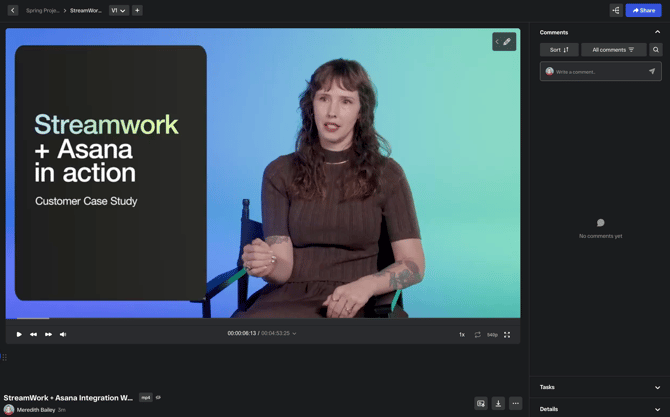
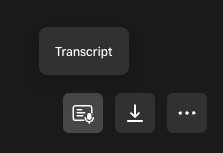
3\. In the lower right area of the screen, click the Transcript icon
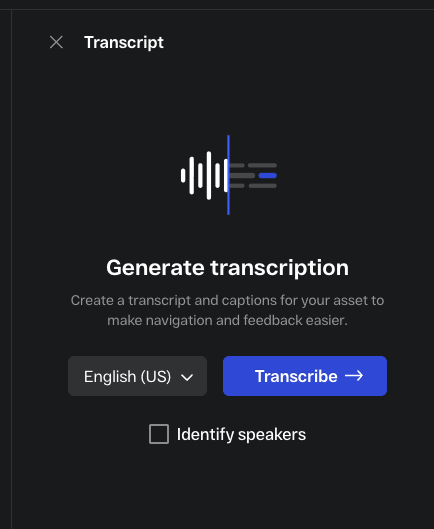
4\. A transcript module will appear in place of the comment panel. Select a language from the 50+ available, and check "Identify speakers" if you would like speakers identified in the transcript. Note: Some states and locations do not allow for speaker identification. If this is the case where you are located, you will see a notification.
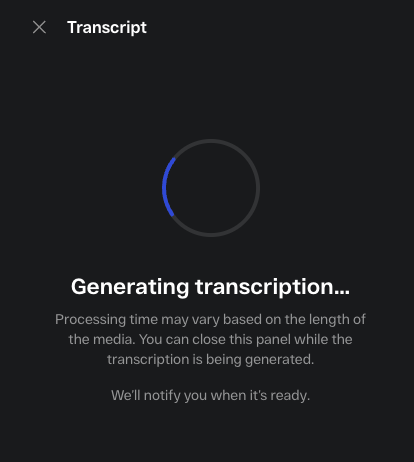
5\. Click "Transcribe" for StreamWork to automatically create a transcript of the media. You can leave the current screen while the transcript is being generated. StreamWork will notify you once it's ready so you can navigate back to the file.
Note: a transcript can only be generated if the media includes voiceover.
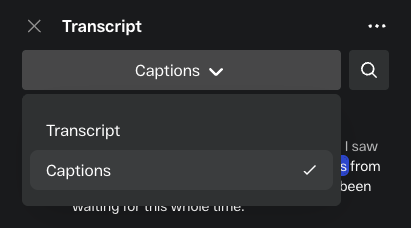
6\. Once the transcript is auto-generated, you will have the option to select between Transcript view or Closed Caption view. Both views offer live speaker tracking which enables you to see words highlighted as they are spoken in the video.
**Multiple speakers**
Where multiple speakers are detected, the transcript will label each speaker separately so you can follow who said what throughout the video.
**Auto-scrolling**
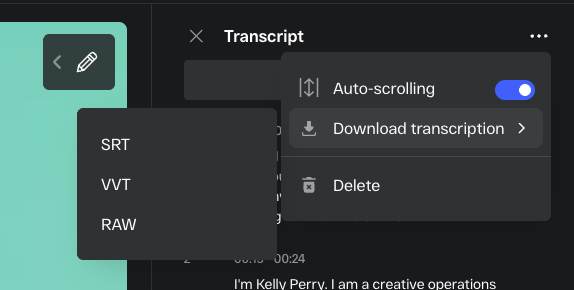
Click the 3 dot menu in the top right to toggle on or off auto-scrolling of the transcript.
**Searching the transcript**
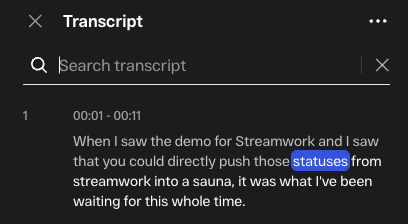
Use the search bar within the Transcript tab to find specific words or phrases. The viewer will jump to the corresponding timestamp in the video.
**Exporting captions**
1. Click the 3 dot menu in the top right
2. Click Download transcription
3. Select your preferred format. Options are SRT, VVT, RAW
4. The caption file will download to your device
**Things to know**
- AI video transcription is available on Enterprise plans only. If you're interested in AI transcription, reach out to your account manager or support@streamwork.com for more information.
- [About StreamWork](https://help.streamwork.com/knowledge/about-streamwork?hsLang=en)
- [Get started](https://help.streamwork.com/knowledge/get-started?hsLang=en)
- [Roles](https://help.streamwork.com/knowledge/roles?hsLang=en)
- [Workspaces](https://help.streamwork.com/knowledge/workspaces?hsLang=en)
- [Projects](https://help.streamwork.com/knowledge/projects?hsLang=en#main-content)
- [Projects - Project Permissions](https://help.streamwork.com/knowledge/projects?hsLang=en#projects-project-permissions)
- [Folders](https://help.streamwork.com/knowledge/folders?hsLang=en)
- [Media](https://help.streamwork.com/knowledge/media?hsLang=en#main-content)
- [Media - Media Management](https://help.streamwork.com/knowledge/media?hsLang=en#media-media-management)
- [Comments and Annotations](https://help.streamwork.com/knowledge/comments-and-annotations?hsLang=en#main-content)
- [Comments and Annotations - Management](https://help.streamwork.com/knowledge/comments-and-annotations?hsLang=en#comments-and-annotations-management)
- [Tasks](https://help.streamwork.com/knowledge/tasks?hsLang=en#main-content)
- [Tasks - Task Management](https://help.streamwork.com/knowledge/tasks?hsLang=en#tasks-task-management)
- [Approval routing](https://help.streamwork.com/knowledge/approval-routing?hsLang=en)
- [Share links](https://help.streamwork.com/knowledge/share-links?hsLang=en)
- [Integrations](https://help.streamwork.com/knowledge/integrations?hsLang=en)
- [Account settings and notifications](https://help.streamwork.com/knowledge/account-settings-and-notifications?hsLang=en)
[](https://www.streamwork.com/)
Copyright © 2026, StreamWork