![logo--white-s-2.svg]](https://help.streamwork.com/hubfs/logo--white-s-2.svg)
Not installed yet? Start with Install StreamWork for Adobe Creative Cloud.
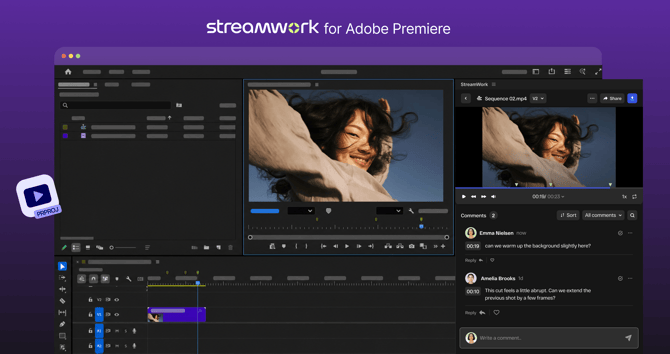
Export a sequence
- Open your project in Premiere and select the sequence you want to send.
- Open the StreamWork panel.
- Choose where it goes: workspace, folder, or project.
- Choose New media to start a new review, or New version to add it to an existing proof.
- Choose the range: Entire sequence or In/out points.
- Choose an export preset, such as High Quality 1080p HD.
- Click Export. Your sequence uploads to StreamWork, ready for review.
Markers and comments
- Your markers become comments. Markers you add in Premiere export as comments in StreamWork, so you can flag questions or notes for reviewers.
- Reviewer comments come back as markers. Feedback left in StreamWork appears as markers on your Premiere timeline.
- Read comments in the panel. You can also open and read all comments inside the StreamWork panel.
Import StreamWork media
Import media from StreamWork into your Premiere project, or link a sequence to existing media in StreamWork, without switching to your browser.
Versions and comparison
When you export a new cut as a new version, it stacks on the same proof in StreamWork. Reviewers can compare versions side by side to see what changed and confirm every note was addressed.
Approvals
Once your sequence is in StreamWork, it moves through your approval workflow there: creative, marketing, brand, legal, and leadership, in the order your team sets. Export the next cut from Premiere whenever you're ready.
Tips
- Use In/out points to send just the section reviewers need.
- Use New version, not New media, for revised cuts so feedback history stays together.